Outfit Persistence [.NET] 0.0.8 (Legacy & Enhanced)


2 370
47
-
 13 avril 2026
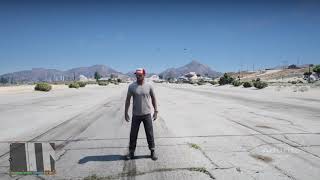
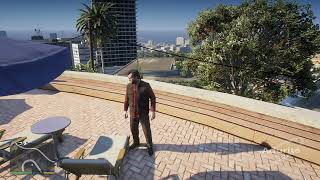
You know how you spend time putting together a great custom outfit, but the second you switch characters or load a save, the game puts them back in some random vanilla clothes, This mod fixes that completely. Outfit Persistence lets you save an unlimited amount of custom outfits and forces the game to keep them on.
Features
- Universal Character Support: Works fully with Michael, Franklin, Trevor, MP Freemode models (Male/Female), Add-on Peds, and absolutely any other character model you play as!
- Built-in Model Changer: (New!) Swap to story characters, MP models, or type the exact spawn name of any Add-on ped directly from the menu.
- Infinite Wardrobe & Organization: Build the ultimate closet! Name and save an unlimited number of custom outfits. Easily Duplicate outfits to make variations, Sort them (A-Z, Primary, Situation), and Quick Search to find exactly what you want to wear.
- Advanced MP Character Support: (New!) Are you playing as a Freemode ped. The mod can now save your exact Makeup, Hair Colors, Facial Expressions (Moods), and MP Face Genetics directly to your outfit!
- Mission-Safe & Randomizer: Mark your favorite outfits as "Primary" to have the mod randomly pick one when you boot the game or when you switch characters. Even better, It actively locks your outfit during missions and cutscenes so the game can't ruin your immersion! (You can disable this in Settings.)
- Outfit-Linked Walk Styles & Heel Fixer: Assign specific walking animations to your outfits. Equip the clothes, and your character's walk style changes instantly! Includes an Auto-Fix toggle for Female High Heels to prevent broken ankles.
- Advanced Slot Locks & Tattoos: Lock specific clothing items (Hair, Beard, Hats, Glasses, Tops, Pants, etc.) so they never change when equipping new outfits. You can also toggle whether to keep or wipe your character's tattoos!
- Easy Outfit Sharing: Share your outfit .json files with friends! Drop a downloaded outfit into the specific character's folder it was made for while playing, and the mod detects it instantly without needing a restart.
- Dynamic Situational Outfits (Beta): Assign outfits to specific situations. Jump into the water and your "Swimming" outfit equips automatically. Get a wanted level and your "Combat" gear comes on. Also works for stealth, riding bikes, and flying.
- Living World Persistence: When you switch characters, the AI takes over but they keep wearing your custom outfit while walking around Los Santos instead of reverting to boring default clothes.
- Packed with QoL Features: Instantly clean blood/dirt or heal up when changing, use the seamless "Live Preview" to see clothes as you scroll the menu, easily overwrite saves, and toggle quick accessories (hats/glasses/masks) on the fly.
- Free-Roam Friendly: Designed to run smoothly in the background without breaking clothing stores, barbers, or your favorite trainer menus.
Requirements
- ScripthookVDotNet3 Nightly (Legacy)
- ScriptHookVDotNet Enhanced (SHVDNE) (Enhanced - REQUIRED for Enhanced edition)
- LemonUI SHVDN3
GTA V Version Compatibility:
- This mod works on both Legacy and Enhanced versions of GTA V.
- For Legacy, you can use either ScripthookVDotNet3 Nightly or ScriptHookVDotNet Enhanced (SHVDNE).
- For Enhanced, you must use ScriptHookVDotNet Enhanced (SHVDNE).
Changelog
- v0.0.8 (Latest)
- Realism Mode: Added a new optional "Realism Mode" setting (off by default). When enabled, you must be near a wardrobe, near a clothing store, or inside an interior to change your outfit, adding an extra layer of immersion.
- Minor bug fixes.
- v0.0.7
- Universal SHVDN Compatibility: Completely rewrote the notification system to use raw GTA Natives. The mod is now fully compatible with any ScriptHookVDotNet version mismatches and works perfectly on the newest Nightly builds (121) and older versions
- Expanded Quick Accessories: Added a quick toggle to equip/remove Bags & Parachutes.
- New Settings: Added "Prevent Auto-Helmets" (stops the game from forcing motorcycle helmets on you to preserve hairstyles/hats) and "Auto-Wash in Water" (dynamically cleans blood/dirt off your character when you swim).
- Expanded Auto Name Folders & Auto-Migration: Added proper character names for Amanda, Jimmy, Tracey, Lamar, and Lester. The mod will now automatically and safely migrate your old Ped-hash save folders for these Characters into these newly named folders so you don't lose any outfits!
- More Walk Styles: Added several new walk styles, including Injured, Very Drunk, Hobo, and Fleeing variations.
- Bug Fix: Fixed the false-alarm "New Outfits Detected!" popup that triggered incorrectly when renaming or duplicating an outfit inside the menu.
- v0.0.6
- Built-in Model Changer: Added a new menu to instantly swap to story characters, MP models, or custom Add-on peds by typing their spawn name.
- MP Character & Advanced Settings: Added a dedicated menu for Freemode models. You can now toggle the saving of Makeup, Face Overlays, Hair Colors, Facial Moods (Expressions), and MP Genetics (Mom/Dad face blends)!
- High Heels Auto-Fix: Added a toggle to automatically apply the proper female heel walk style when equipping high heels to prevent the broken ankle glitch.
- Sorting & Quick Search: You can now sort your massive outfit lists (A-Z, Primary First, Situation First) and use the new Search button to filter outfits by name instantly.
- Duplicate Outfits: Added a "Duplicate" button to easily clone an outfit. It pre-fills the keyboard prompt with the original name so you can make quick variations (e.g., "Casual" -> "Casual Copy").
- Visual "Equipped" Indicator: The actively worn outfit now displays a green "[E]" tag in the menu so you always know what you are currently wearing.
- Major Bug Fix: Completely rewrote the Apply Outfit logic. Fixed an annoying bug where Slot Locks (like ignoring Tops or Pants) would sometimes result in a glitched invisible torso or default clothes for the ped.
- Major Bug Fix 2: Walk Styles now apply flawlessly and instantly. Fixed the bug where backing out of the Live Preview would wipe your currently active walk style.
- UI Polish: Shortened menu tags ("[PRIMARY]" to "[P]") to prevent text overlapping with the menu arrows.
- v0.0.5
- Walk Styles: You can now link specific walking animations to your saved outfits.
- Advanced Slot Locks: Added a new menu to lock specific clothing parts (Hair, Beard, Hats, Glasses, Masks, Tops, Pants, Shoes) so they are ignored when equipping new outfits.
- Outfit Sharing & Live-Update: You can now easily share your outfit .json files. Dropping a friend's outfit file into the specific character's folder will instantly update your in-game menu without needing to restart!
- Improved Folder Naming: Multiplayer character folders are now cleanly named MP Male and MP Female instead of random numbers.
- Added a new "Help & Info" tab in the main mod menu.
- Added "Stealth" to the Situational Auto-Equip triggers.
- v0.0.4
- Added a Keep Hair & Face option: Equipping an outfit will no longer overwrite your current haircut or beard if enabled!
- Fixed a critical mission soft-lock where the game would bug out when missions tried to force you to wear a parachute bag, when you had Outfit Lock Enabled.
- v0.0.3
- Migrated to LemonUI for a much more stable, modern, and bug-free menu experience.
- Added Live Preview: Scrolling through saved outfits will temporarily apply them to your character.
- Allow changing Primary Outfits during missions to update the Outfit Lock.
- Dynamic Quick Accessories menu text that updates based on what you wear.
- v0.0.2
- Added Rename Outfit, Randomize Outfit, and Revert to Default options.
- Fixed bugs where loading a manual save, dying, or entering a vehicle would revert you to default clothes.
- Major CPU performance optimizations for background checks.
Installation
Help & Troubleshooting
- Where are my clothes saved The .json files are saved inside scripts \ OutfitPersistence \ (Character Name).
- How do I share outfits Just copy the .json file of your outfit and send it to your friend! If they drop it into the specific character folder it was made for while playing, the mod will instantly load it.
- Mod does not work: Ensure ScripthookVDotNet, ScripthookV, and LemonUI are installed correctly. (Note: NativeUI is no longer used!)
Credits
Author: Adurite
Feel free to use this in videos or modpacks, just credit me and link back to this page. Please do not re-upload the raw file to other sites without permission.
Première mise en ligne : 13 avril 2026
Dernière mise à jour : 28 avril 2026
Téléchargé pour la dernière fois : il y a 2 heures
All Versions
53 commentaires
More mods by Adurite:
![Crash Encounters [.NET]](https://img.gta5-mods.com/q75-w500-h333-cfill/images/crash-encounters/386096-iamgefull.png "Crash Encounters [.NET]")
- Gameplay
- .Net
- Véhicules
- Featured
You know how you spend time putting together a great custom outfit, but the second you switch characters or load a save, the game puts them back in some random vanilla clothes, This mod fixes that completely. Outfit Persistence lets you save an unlimited amount of custom outfits and forces the game to keep them on.
Features
- Universal Character Support: Works fully with Michael, Franklin, Trevor, MP Freemode models (Male/Female), Add-on Peds, and absolutely any other character model you play as!
- Built-in Model Changer: (New!) Swap to story characters, MP models, or type the exact spawn name of any Add-on ped directly from the menu.
- Infinite Wardrobe & Organization: Build the ultimate closet! Name and save an unlimited number of custom outfits. Easily Duplicate outfits to make variations, Sort them (A-Z, Primary, Situation), and Quick Search to find exactly what you want to wear.
- Advanced MP Character Support: (New!) Are you playing as a Freemode ped. The mod can now save your exact Makeup, Hair Colors, Facial Expressions (Moods), and MP Face Genetics directly to your outfit!
- Mission-Safe & Randomizer: Mark your favorite outfits as "Primary" to have the mod randomly pick one when you boot the game or when you switch characters. Even better, It actively locks your outfit during missions and cutscenes so the game can't ruin your immersion! (You can disable this in Settings.)
- Outfit-Linked Walk Styles & Heel Fixer: Assign specific walking animations to your outfits. Equip the clothes, and your character's walk style changes instantly! Includes an Auto-Fix toggle for Female High Heels to prevent broken ankles.
- Advanced Slot Locks & Tattoos: Lock specific clothing items (Hair, Beard, Hats, Glasses, Tops, Pants, etc.) so they never change when equipping new outfits. You can also toggle whether to keep or wipe your character's tattoos!
- Easy Outfit Sharing: Share your outfit .json files with friends! Drop a downloaded outfit into the specific character's folder it was made for while playing, and the mod detects it instantly without needing a restart.
- Dynamic Situational Outfits (Beta): Assign outfits to specific situations. Jump into the water and your "Swimming" outfit equips automatically. Get a wanted level and your "Combat" gear comes on. Also works for stealth, riding bikes, and flying.
- Living World Persistence: When you switch characters, the AI takes over but they keep wearing your custom outfit while walking around Los Santos instead of reverting to boring default clothes.
- Packed with QoL Features: Instantly clean blood/dirt or heal up when changing, use the seamless "Live Preview" to see clothes as you scroll the menu, easily overwrite saves, and toggle quick accessories (hats/glasses/masks) on the fly.
- Free-Roam Friendly: Designed to run smoothly in the background without breaking clothing stores, barbers, or your favorite trainer menus.
Requirements
- ScripthookVDotNet3 Nightly (Legacy)
- ScriptHookVDotNet Enhanced (SHVDNE) (Enhanced - REQUIRED for Enhanced edition)
- LemonUI SHVDN3
GTA V Version Compatibility:
- This mod works on both Legacy and Enhanced versions of GTA V.
- For Legacy, you can use either ScripthookVDotNet3 Nightly or ScriptHookVDotNet Enhanced (SHVDNE).
- For Enhanced, you must use ScriptHookVDotNet Enhanced (SHVDNE).
Changelog
- v0.0.8 (Latest)
- Realism Mode: Added a new optional "Realism Mode" setting (off by default). When enabled, you must be near a wardrobe, near a clothing store, or inside an interior to change your outfit, adding an extra layer of immersion.
- Minor bug fixes.
- v0.0.7
- Universal SHVDN Compatibility: Completely rewrote the notification system to use raw GTA Natives. The mod is now fully compatible with any ScriptHookVDotNet version mismatches and works perfectly on the newest Nightly builds (121) and older versions
- Expanded Quick Accessories: Added a quick toggle to equip/remove Bags & Parachutes.
- New Settings: Added "Prevent Auto-Helmets" (stops the game from forcing motorcycle helmets on you to preserve hairstyles/hats) and "Auto-Wash in Water" (dynamically cleans blood/dirt off your character when you swim).
- Expanded Auto Name Folders & Auto-Migration: Added proper character names for Amanda, Jimmy, Tracey, Lamar, and Lester. The mod will now automatically and safely migrate your old Ped-hash save folders for these Characters into these newly named folders so you don't lose any outfits!
- More Walk Styles: Added several new walk styles, including Injured, Very Drunk, Hobo, and Fleeing variations.
- Bug Fix: Fixed the false-alarm "New Outfits Detected!" popup that triggered incorrectly when renaming or duplicating an outfit inside the menu.
- v0.0.6
- Built-in Model Changer: Added a new menu to instantly swap to story characters, MP models, or custom Add-on peds by typing their spawn name.
- MP Character & Advanced Settings: Added a dedicated menu for Freemode models. You can now toggle the saving of Makeup, Face Overlays, Hair Colors, Facial Moods (Expressions), and MP Genetics (Mom/Dad face blends)!
- High Heels Auto-Fix: Added a toggle to automatically apply the proper female heel walk style when equipping high heels to prevent the broken ankle glitch.
- Sorting & Quick Search: You can now sort your massive outfit lists (A-Z, Primary First, Situation First) and use the new Search button to filter outfits by name instantly.
- Duplicate Outfits: Added a "Duplicate" button to easily clone an outfit. It pre-fills the keyboard prompt with the original name so you can make quick variations (e.g., "Casual" -> "Casual Copy").
- Visual "Equipped" Indicator: The actively worn outfit now displays a green "[E]" tag in the menu so you always know what you are currently wearing.
- Major Bug Fix: Completely rewrote the Apply Outfit logic. Fixed an annoying bug where Slot Locks (like ignoring Tops or Pants) would sometimes result in a glitched invisible torso or default clothes for the ped.
- Major Bug Fix 2: Walk Styles now apply flawlessly and instantly. Fixed the bug where backing out of the Live Preview would wipe your currently active walk style.
- UI Polish: Shortened menu tags ("[PRIMARY]" to "[P]") to prevent text overlapping with the menu arrows.
- v0.0.5
- Walk Styles: You can now link specific walking animations to your saved outfits.
- Advanced Slot Locks: Added a new menu to lock specific clothing parts (Hair, Beard, Hats, Glasses, Masks, Tops, Pants, Shoes) so they are ignored when equipping new outfits.
- Outfit Sharing & Live-Update: You can now easily share your outfit .json files. Dropping a friend's outfit file into the specific character's folder will instantly update your in-game menu without needing to restart!
- Improved Folder Naming: Multiplayer character folders are now cleanly named MP Male and MP Female instead of random numbers.
- Added a new "Help & Info" tab in the main mod menu.
- Added "Stealth" to the Situational Auto-Equip triggers.
- v0.0.4
- Added a Keep Hair & Face option: Equipping an outfit will no longer overwrite your current haircut or beard if enabled!
- Fixed a critical mission soft-lock where the game would bug out when missions tried to force you to wear a parachute bag, when you had Outfit Lock Enabled.
- v0.0.3
- Migrated to LemonUI for a much more stable, modern, and bug-free menu experience.
- Added Live Preview: Scrolling through saved outfits will temporarily apply them to your character.
- Allow changing Primary Outfits during missions to update the Outfit Lock.
- Dynamic Quick Accessories menu text that updates based on what you wear.
- v0.0.2
- Added Rename Outfit, Randomize Outfit, and Revert to Default options.
- Fixed bugs where loading a manual save, dying, or entering a vehicle would revert you to default clothes.
- Major CPU performance optimizations for background checks.
Installation
Help & Troubleshooting
- Where are my clothes saved The .json files are saved inside scripts \ OutfitPersistence \ (Character Name).
- How do I share outfits Just copy the .json file of your outfit and send it to your friend! If they drop it into the specific character folder it was made for while playing, the mod will instantly load it.
- Mod does not work: Ensure ScripthookVDotNet, ScripthookV, and LemonUI are installed correctly. (Note: NativeUI is no longer used!)
Credits
Author: Adurite
Feel free to use this in videos or modpacks, just credit me and link back to this page. Please do not re-upload the raw file to other sites without permission.
Première mise en ligne : 13 avril 2026
Dernière mise à jour : 28 avril 2026
Téléchargé pour la dernière fois : il y a 2 heures
-
I Guess the newest 118 version of nightly doesnt work, ill have to make a patch to support it and some older versions just in case
19 avril 2026 -
An Update/Patch is planned to come soon for this mod, which makes it compatible with 118 and any future updates of nightly so this issue doesn't happen again.
19 avril 2026 -

-

-
@grubyydyd Explain What about it is bugged? like the clothing? or something, and what features did you have enabled from my mod in the settings.
19 avril 2026 -
-
@grubyydyd you have to disable aggressive outfit lock and force outfits missions before entering paleto heist so the game can apply the armor it gives, or you can keep force outfit on so u wear ur custom outfit in paleto.
20 avril 2026 -
@Adurite @Adurite Wow, this sounds like an ABSOLUTE game changer and something I've waited for since forever, but I have to ask: will it work with characters edited by Menyoo? Because we Menyoo users manage our outfits with it, and sometimes other mods that manage outfits can break those (like, loading the clothing by slots, but messing the face sliders, hair color, etc).
Also, I'm hoping it'll work correctly if you use the Character Swap mod to swap the hashes of the models (mainly for playing as a protagonist with another ped model, mostly the MP ones).
Thanks!
30 avril 2026 -
@CJislit if you’re in Freeroam my Mod Doesnt hard force clothes and lets you change them so you can definitely use menyoo to still change clothes with my mod, however when you get to missions and you Enable Force Outfits in Missions, my mod stops all the other mods from changing Components to Lock your outfit, and the even better Thing is my mod still lets you Change outfits saved in my Mod Menu During Missions and it auto updates it (only if you saved an outfit in my mod menu) but this should work with Menyoo but just remember that about Missions if you Have the Force Outfits in Missions feature on in my mod.
1 mai 2026 -
@CJislit It should work with Character Swap as all it looks for is if your Hash is a Protagonist Or Player Or any Ped (Example: Franklin) it doesn’t care if its actually visually franklin, it just relies on Component Ids and if you lets say use a mp character and swap your hash as Franklin it will work and there is built in Mp Saving in my mod for hair color and more, so if you save outfits as Mp Character but swapped to Franklin using character swap which changes hashes, It will work, just remember to load the mp character and switch to franklin so then the Mod Recognizes your Clothing Components.
1 mai 2026 -

I may be the only one having this issue, The outfit loads but the face always resets to the default MP Freemode Male face, even though I saved it with MP Genetics, Makeup, and all face options checked. I also can’t load any outfits after I use Character Swap to change to Franklin’s hash. I have to switch back to MP Freemode Male just to load the outfit, which sucks because I can’t spend money on that model.
4 mai 2026 -

What happen if i load a save with mp character, does it change back to story mode character?
7 mai 2026 -

This mod has great potential, however it doesn't work very well w the mp characters. Unless if there's a specific way to do it, it won't save and load the face settings i set using simple trainer or skin control. Using this mod, the hair loads green, the face is default and without any face details.
And another weird thing is the undershirt loads as the default blue one too.
Otherwise every other feature of this mod is fantastic :) it pairs well with "working character switch"13 mai 2026 -
Hey, mod doesn't currently work for me. It's not even creating the OutfitPersistance folder or config.ini file. Any recommendations as to a fix? Currently running nightly version 141 if that helps. Any known incompatibilities?
22 mai 2026 -
Second comment for more information. It's getting a API version 3.9.0 error. Any ideas what could be causing it? And thank you for any help you can provide.
22 mai 2026 -
Update: Upgrading to SHVDNE instead of SHVDN Nightly seems to have fixed the issue. I'm playing on Legacy so I'm not sure how that works but all my other scripthook mods seem to be working as intended so far. Will update further if there are any discrepancies for future reference.
22 mai 2026 -

this is a really great mod, its really helps with everything, although does anyone know any mods for economy involvement for mp male/female in sp?
I cant earn any money as mp freemode character and the mod i have tried is fleeca banking system, but no avail.
22 mai 2026 -
This mod is absolutely amazing, i have lots of custom outfit ideas for my story characters, and now i can save all of em and keep em on!
Only problem is that the mod is slightly bugged, sometimes characters will auto equip non primary outfits in cutscenes. So michael would have his Jewel store job loud outfit (saved , unequipped, and not primary) on in the cutscene that takes place in michaels house where davey gets pissed.
25 mai 2026 -
-
@Adurite
I have the following errors in log:[08:29:10] [DEBUG] Loading assembly OutfitPersistence.dll ...
[08:29:10] [WARNING] Unable to resolve API version 3.9.0.
[08:29:10] [ERROR] Failed to load script assembly OutfitPersistence.dll when searching for script types because there is an assembly that the script tried to load as a dependency but couldn't. Exception message: Unable to load one or more of the requested types. Retrieve the LoaderExceptions property for more information.
First LoaderException message (which tells what assembly is missing): System.IO.FileNotFoundException: Could not load file or assembly 'ScriptHookVDotNet3, Version=3.9.0.0, Culture=neutral, PublicKeyToken=null' or one of its dependencies. The system cannot find the file specified.
File name: 'ScriptHookVDotNet3, Version=3.9.0.0, Culture=neutral, PublicKeyToken=null'21 juin 2026
 5mods on Discord

If you run into any bugs, have issues getting it to work, or have ideas for future updates, please post them in the comments below! I'll be checking them.