Easy Mod Folder (EMF) 1.7

![Unmarked BMW F10 - Austrian Edition [ELS]](https://img.gta5-mods.com/q75-w500-h333-cfill/images/unmarked-bmw-f10-austrian-edition-els/9d1dae-1.jpg "Unmarked BMW F10 - Austrian Edition [ELS]")
301 396
1 328
301 396
1 328
Easy Mod Folder (EMF) V1.7
PLEASE READ THIS BEFORE INSTALLING IT!
INFORMATION
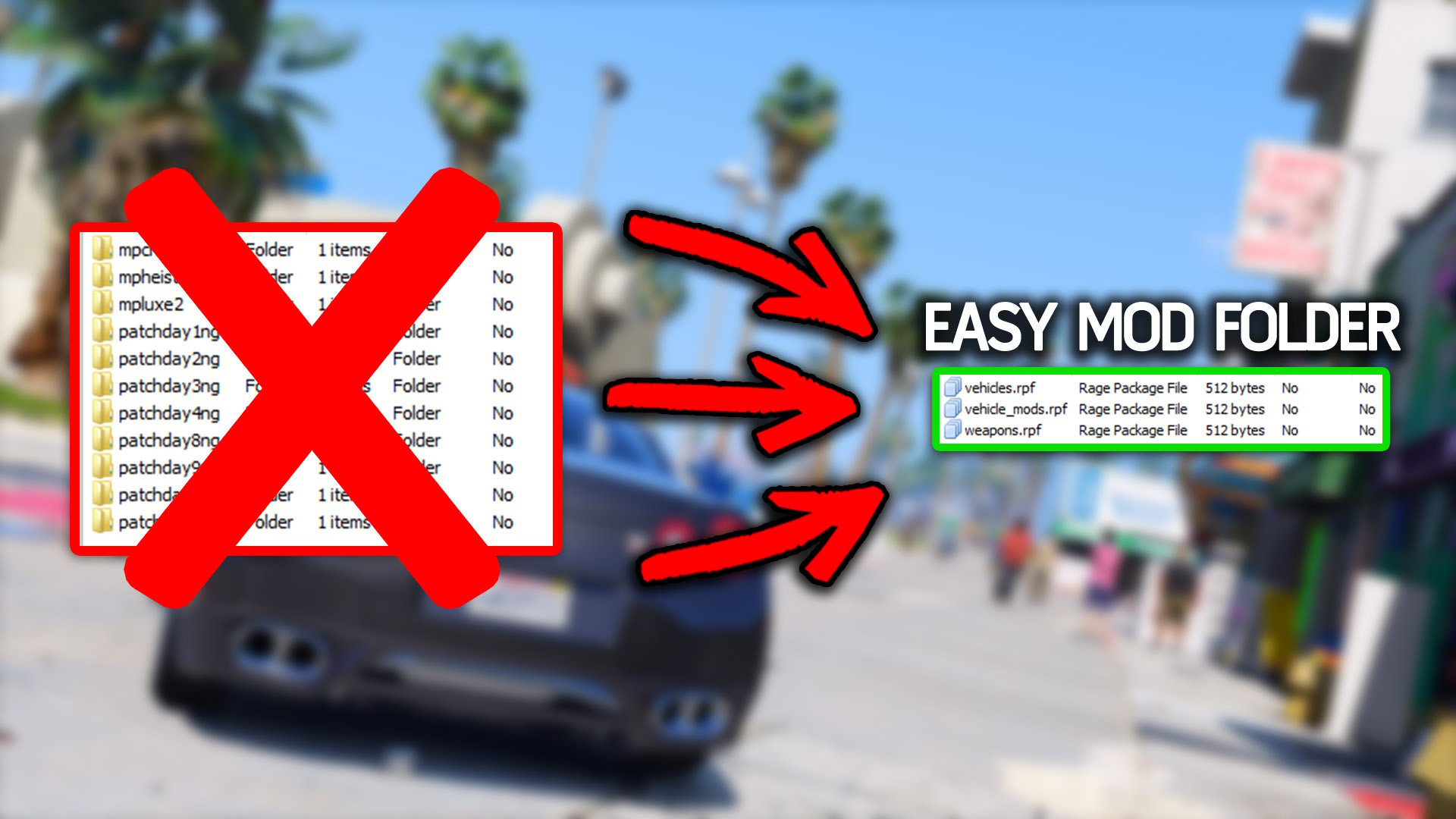
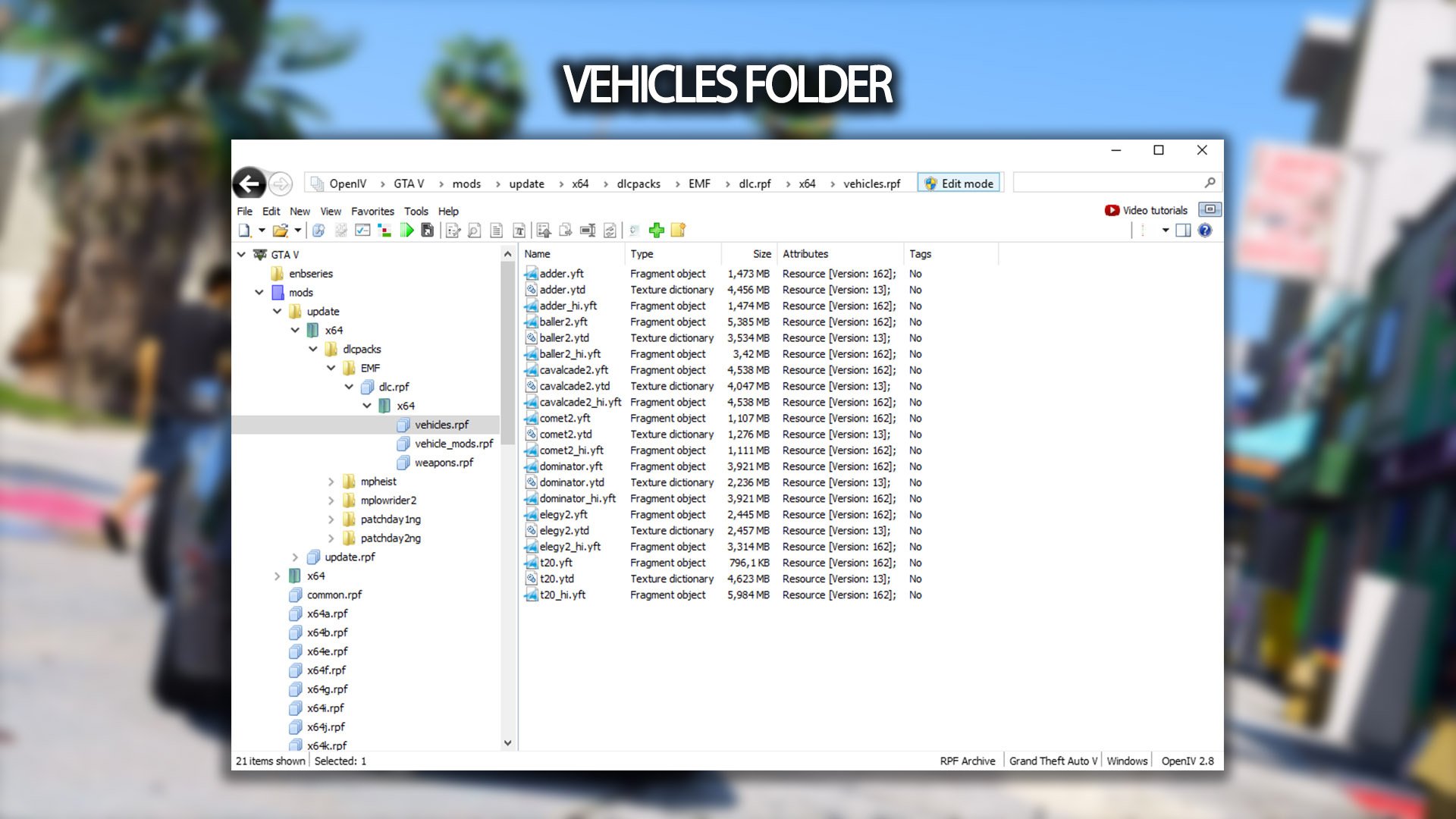
This mod makes it easy to replace cars, weapons & peds. You don't need to search for the patchdayX or x64X-folders anymore. Just put all your mod-cars into vehicles.rpf, weapons into weapons.rpf etc. Pls don't put META or other files into a rpf! Put only ytd, ydr & yft into the rpfs's!
META
Install handling, carvariations etc. like you normally do.
PATH
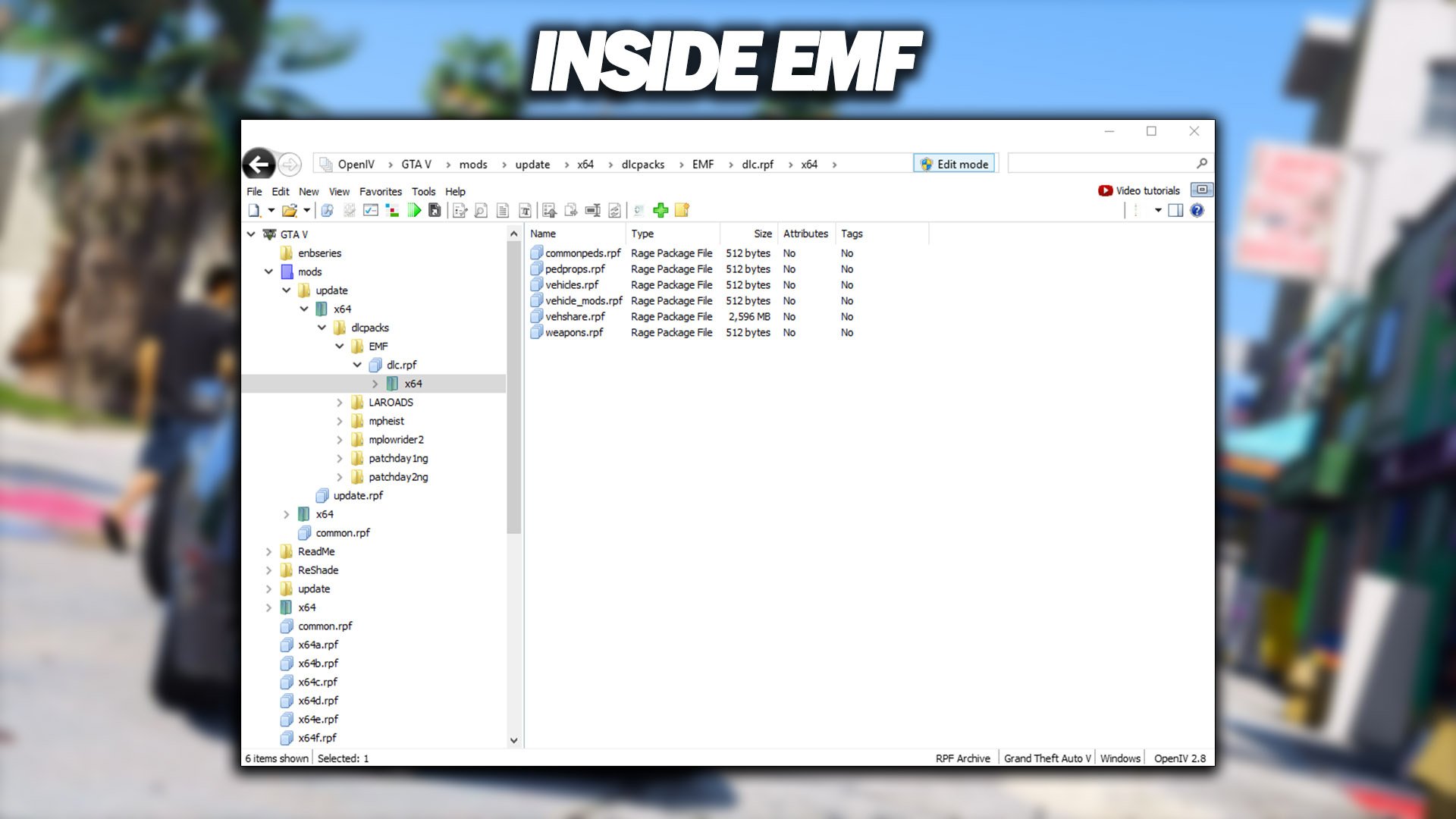
RPF-files can be found here:
\mods\update\x64\dlcpacks\EMF\dlc.rpf\x64
TUNINGPARTS
Tuningparts are supported! You need to put them into "vehicle_mods.rpf". DONT PUT THE RPF INSIDE THE "vehicle_mods.rpf". You need the ytd, ydr or yft files.
PLACEHOLDER
DON'T REMOVE THE PLACEHOLDER IN VEHSHARE.RPF!
There is a vehshare.ytd inside the vehshare.rpf Don't remove the vehshare.ytd or your game will crash. You can overwrite it with mod-files. But don't delete it!
ADDONS?
My EMF isn't made for addons. It's made for replacing things. If you want to use addons, you can install:
Add-On / Replace Base Folder
INSTALLATION?
Read the ReadMe :)
HIGHLY RECOMMENDED WHEN REPLACING CARS:
Replace Cars Fix Install this to prevent flickering and gamecrashes when replacing cars.
This meta file removes tuningparts from the AI traffic. Most of replacer cars don't have proper tuning parts (so they will use the original tuningparts from GTA 5). This will cause flickering and random crashing when a replaced car spawns with the wrong tuningparts. I highly recommend to install this mod when you want to replace cars.
GAME CRASH?
Check if you installed everything correctly.
If it still crashes, use a custom gameconfig with packfile limit adjuster and heap limit adjuster:
Gameconfig
Packfile Limit Adjuster
Heap Limit Adjuster
OTHER STUFF
You need OpenIV to use this folder!
Download OpenIV
Make a backup if you are a noob at modding :D
Don't reupload this mod!
CHANGELOG
V1.7 -small fix for readme and rpf files
V1.6 -fixed vehshare & added ped support
V1.5 -New EMF system
V1.4 -fixed meta-lines in content.xml
V1.3 -META files are supported
V1.2 -peds & pedprops are supported
V1.1 -vehiclemods are supported now
PLEASE READ THIS BEFORE INSTALLING IT!
INFORMATION
This mod makes it easy to replace cars, weapons & peds. You don't need to search for the patchdayX or x64X-folders anymore. Just put all your mod-cars into vehicles.rpf, weapons into weapons.rpf etc. Pls don't put META or other files into a rpf! Put only ytd, ydr & yft into the rpfs's!
META
Install handling, carvariations etc. like you normally do.
PATH
RPF-files can be found here:
\mods\update\x64\dlcpacks\EMF\dlc.rpf\x64
TUNINGPARTS
Tuningparts are supported! You need to put them into "vehicle_mods.rpf". DONT PUT THE RPF INSIDE THE "vehicle_mods.rpf". You need the ytd, ydr or yft files.
PLACEHOLDER
DON'T REMOVE THE PLACEHOLDER IN VEHSHARE.RPF!
There is a vehshare.ytd inside the vehshare.rpf Don't remove the vehshare.ytd or your game will crash. You can overwrite it with mod-files. But don't delete it!
ADDONS?
My EMF isn't made for addons. It's made for replacing things. If you want to use addons, you can install:
Add-On / Replace Base Folder
INSTALLATION?
Read the ReadMe :)
HIGHLY RECOMMENDED WHEN REPLACING CARS:
Replace Cars Fix Install this to prevent flickering and gamecrashes when replacing cars.
This meta file removes tuningparts from the AI traffic. Most of replacer cars don't have proper tuning parts (so they will use the original tuningparts from GTA 5). This will cause flickering and random crashing when a replaced car spawns with the wrong tuningparts. I highly recommend to install this mod when you want to replace cars.
GAME CRASH?
Check if you installed everything correctly.
If it still crashes, use a custom gameconfig with packfile limit adjuster and heap limit adjuster:
Gameconfig
Packfile Limit Adjuster
Heap Limit Adjuster
OTHER STUFF
You need OpenIV to use this folder!
Download OpenIV
Make a backup if you are a noob at modding :D
Don't reupload this mod!
CHANGELOG
V1.7 -small fix for readme and rpf files
V1.6 -fixed vehshare & added ped support
V1.5 -New EMF system
V1.4 -fixed meta-lines in content.xml
V1.3 -META files are supported
V1.2 -peds & pedprops are supported
V1.1 -vehiclemods are supported now
Première mise en ligne : 16 août 2016
Dernière mise à jour : 18 octobre 2019
Téléchargé pour la dernière fois : il y a 1 heure
731 commentaires
More mods by CSYON:
Easy Mod Folder (EMF) V1.7
PLEASE READ THIS BEFORE INSTALLING IT!
INFORMATION
This mod makes it easy to replace cars, weapons & peds. You don't need to search for the patchdayX or x64X-folders anymore. Just put all your mod-cars into vehicles.rpf, weapons into weapons.rpf etc. Pls don't put META or other files into a rpf! Put only ytd, ydr & yft into the rpfs's!
META
Install handling, carvariations etc. like you normally do.
PATH
RPF-files can be found here:
\mods\update\x64\dlcpacks\EMF\dlc.rpf\x64
TUNINGPARTS
Tuningparts are supported! You need to put them into "vehicle_mods.rpf". DONT PUT THE RPF INSIDE THE "vehicle_mods.rpf". You need the ytd, ydr or yft files.
PLACEHOLDER
DON'T REMOVE THE PLACEHOLDER IN VEHSHARE.RPF!
There is a vehshare.ytd inside the vehshare.rpf Don't remove the vehshare.ytd or your game will crash. You can overwrite it with mod-files. But don't delete it!
ADDONS?
My EMF isn't made for addons. It's made for replacing things. If you want to use addons, you can install:
Add-On / Replace Base Folder
INSTALLATION?
Read the ReadMe :)
HIGHLY RECOMMENDED WHEN REPLACING CARS:
Replace Cars Fix Install this to prevent flickering and gamecrashes when replacing cars.
This meta file removes tuningparts from the AI traffic. Most of replacer cars don't have proper tuning parts (so they will use the original tuningparts from GTA 5). This will cause flickering and random crashing when a replaced car spawns with the wrong tuningparts. I highly recommend to install this mod when you want to replace cars.
GAME CRASH?
Check if you installed everything correctly.
If it still crashes, use a custom gameconfig with packfile limit adjuster and heap limit adjuster:
Gameconfig
Packfile Limit Adjuster
Heap Limit Adjuster
OTHER STUFF
You need OpenIV to use this folder!
Download OpenIV
Make a backup if you are a noob at modding :D
Don't reupload this mod!
CHANGELOG
V1.7 -small fix for readme and rpf files
V1.6 -fixed vehshare & added ped support
V1.5 -New EMF system
V1.4 -fixed meta-lines in content.xml
V1.3 -META files are supported
V1.2 -peds & pedprops are supported
V1.1 -vehiclemods are supported now
PLEASE READ THIS BEFORE INSTALLING IT!
INFORMATION
This mod makes it easy to replace cars, weapons & peds. You don't need to search for the patchdayX or x64X-folders anymore. Just put all your mod-cars into vehicles.rpf, weapons into weapons.rpf etc. Pls don't put META or other files into a rpf! Put only ytd, ydr & yft into the rpfs's!
META
Install handling, carvariations etc. like you normally do.
PATH
RPF-files can be found here:
\mods\update\x64\dlcpacks\EMF\dlc.rpf\x64
TUNINGPARTS
Tuningparts are supported! You need to put them into "vehicle_mods.rpf". DONT PUT THE RPF INSIDE THE "vehicle_mods.rpf". You need the ytd, ydr or yft files.
PLACEHOLDER
DON'T REMOVE THE PLACEHOLDER IN VEHSHARE.RPF!
There is a vehshare.ytd inside the vehshare.rpf Don't remove the vehshare.ytd or your game will crash. You can overwrite it with mod-files. But don't delete it!
ADDONS?
My EMF isn't made for addons. It's made for replacing things. If you want to use addons, you can install:
Add-On / Replace Base Folder
INSTALLATION?
Read the ReadMe :)
HIGHLY RECOMMENDED WHEN REPLACING CARS:
Replace Cars Fix Install this to prevent flickering and gamecrashes when replacing cars.
This meta file removes tuningparts from the AI traffic. Most of replacer cars don't have proper tuning parts (so they will use the original tuningparts from GTA 5). This will cause flickering and random crashing when a replaced car spawns with the wrong tuningparts. I highly recommend to install this mod when you want to replace cars.
GAME CRASH?
Check if you installed everything correctly.
If it still crashes, use a custom gameconfig with packfile limit adjuster and heap limit adjuster:
Gameconfig
Packfile Limit Adjuster
Heap Limit Adjuster
OTHER STUFF
You need OpenIV to use this folder!
Download OpenIV
Make a backup if you are a noob at modding :D
Don't reupload this mod!
CHANGELOG
V1.7 -small fix for readme and rpf files
V1.6 -fixed vehshare & added ped support
V1.5 -New EMF system
V1.4 -fixed meta-lines in content.xml
V1.3 -META files are supported
V1.2 -peds & pedprops are supported
V1.1 -vehiclemods are supported now
Première mise en ligne : 16 août 2016
Dernière mise à jour : 18 octobre 2019
Téléchargé pour la dernière fois : il y a 1 heure
 5mods on Discord

Can't thank you enough for this, I never used anything like this (and don't remember any being available) in GTAIV and it was a real pain in the ass to replace, keep track of what was replaced and you had to keep copies of backups which grew to a sizeable amount if you replaced a lot of peds.
This method is much easier, faster, more foolproof too, thanks man!
@AfiqSana16 Mine gets corrupted too, not sure why
Great mod, but for some reason really prone to corrupted files. Is it working perfectly for anyone? If not what are y'all using?
@M4RKSMN probably because it doesn't support for new versions maybe, because i tried installed it in old versions (1.0.3407.0) and it worked just fine.
@AfiqSana16 oh rip, I'm using the latest version
Since this repo is no longer maintained,
Here is an update for GTA 5 Enhanced:
https://www.mediafire.com/file/lhr3k45rgs6eppj/EMF_Enhanced.zip/file
Seems not to work anymore for legacy
@admiral_199 Not work. Change the vehshare.ytd / Change the content.xml.
Not working anymore on legacy ?
The old EMF archive is still working with legacy versions.
Tested on: version 1.0.3095 (online v1.68)
You only need updated vehshare.ytd archive.
For the Enhanced version:
1. Rebuild the entire EMF dlc.rpf and other rpf archives, use the last CodeWalker30-dev48 or higher.
2. If the old content.xml doesn't work: Use only the setup.xml from the old EMF and replace the content.xml with the one provided in the previous post.
3. Search for the most recent vehshare.ytd archive, it should be in patch23_02 or choose the biggest size.
4. Drop the newest vehshare.ytd into the vehshare.rpf
5. Add only one asset that was confirmed working with the "Enhanced" version.
6. Start your game with no .asi script beside OpenRPF, meaning no trainer.asi or any scripts folder. Do not add any other dlc beside EMF.
If this work, gradually add new assets and dlc(s) and scripts as usual.
Remember even the most experienced developers and modellers crash their game before it can load any thing!
The Enhanced version is next gen that require updated archives and textures,
also require new tools and scripts, the ones available right now are not fully compatible or still in early development.
My recommendation:
1. Wait for the proper conversion tools and recent updated scripts especially .asi loader.
2. Downgrade to more stable and reliable version 1.0.3095 (online v1.68)
3. ENB last version by Boris Voronstov, (I use it for puddles dynamic reflection).
The only missing thing that hopefully will be available soon is dynamic reflection on vehicles paint and mirrors,
as for Ray Trace (lights and shadow) it's only work for DX12 and RTX series and still in early development by Rockstar.
@admiral_199 How can we update the vehshare.ytd? I tried, but it didn’t work
@CSYON we need update here brother ❤️
@admiral_199 can u plz help me make this work again for legacy version again ??
@CSYON How do I get this working on Legacy version, I've replaced Vehshare but not made any difference. I replaced vehicles but they don't change in game at all. SOME PLS HELP!
tested with my nivinha collection and works just fine.
you need version 1.0.3095 (online v1.68) OR LOWER
3411 1.70 breaks too much and does not work.
downgrade or look for another mod.
I used gta5-mods.com/player/full-nude-stripper_02 before this mod ( only for peds replacement).
To update vehshare ytd, search in all folders with openiv
in ver. 3095 you will find the newest file in: \Grand Theft Auto V\update\x64\dlcpacks\patchday27ng\dlc.rpf\x64\levels\gta5\vehicles.rpf\vehshare.ytd
(always look for the biggest file)
extract it to desktop or so
open: \Grand Theft Auto V\update\x64\dlcpacks\patchday27ng\dlc.rpf\x64\levels\gta5\vehicles.rpf\vehshare.ytd and replace the 2.600kb file with the 5.500kb file
done!
This mod still works fine, not sure what people are talking about
@oloMolo tried your solution but my old EMF folder still doesn' work. My replaced cars don't work. Still dunno how to update that vehshare. Which 2.600KB should be replaced with what 5.500KB file? Inside Vehshare?
@DEMON_PLAYZZZZ did you use it first time or updated for newest patch? I can't make it working, dunno why.
I just downloaded the current one and it works just fine
The problem with this is that during Michael’s “No Risk” quest, changing clothes at the clothing store does not complete the objective.
I can't seem to delete my comment. I wrote it by mistake.